If you are building applications powered by Large Language Models (LLMs), particularly those involving Retrieval-Augmented Generation (RAG), you know the bottleneck usually isn't the model. It is the data ingestion.
Getting high-quality, up-to-date content from the web is deceptively hard. You start with a simple GET request, and suddenly you’re deep in the weeds managing headless Chrome instances to render JavaScript, rotating residential proxies to avoid IP bans, and writing brittle selectors to parse messy HTML.
You spend more time maintaining scraping infrastructure than improving your AI product.
At ScrapingDuck, our mission is to abstract away that entire infrastructure layer. Today, we are excited to introduce a new set of simplified endpoints designed specifically to adhere to the KISS principle and accelerate AI data workflows.
The New Simplified Endpoints
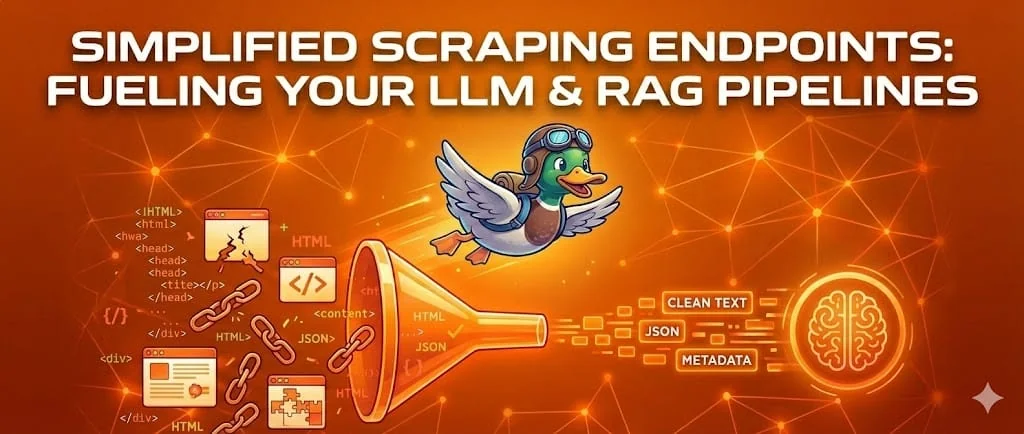
We’ve distilled web scraping down to three powerful, focused GET requests. We handle the browser rendering, anti-bot detection, and retries behind the scenes.
1. The Raw Data: /v1/scrape/source
Sometimes you just need the raw, fully rendered HTML to feed into your existing parsing pipeline. This endpoint navigates to the URL via a headless browser, waits for the JavaScript to execute, and returns the resulting page source directly as a text/html response.
- Best for: Traditional scraping workflows where you have custom parsing logic.
2. The Full Picture: /v1/scrape/result
When you need context alongside the content. This endpoint returns a JSON object containing the rendered HTML plus crucial metadata like response headers, status codes, and timing information.
- Best for: Debugging scraping workflows, auditing data lineage, or when you need response headers for downstream processing.
3. The LLM Special: /v1/scrape/article
This is the game-changer for RAG developers.
Feeding raw HTML into an LLM is inefficient and expensive. Navigation bars, footers, ads, and sidebars waste precious context window tokens and confuse embeddings.
The /article endpoint uses advanced extraction logic to strip away the noise automatically. It identifies the main body content of a page and returns clean, readable text ready for vectorization.
- Best for: Feeding RAG pipelines, summarizing news, monitoring competitor blogs, and any LLM application.
Why Use /article for RAG?
In a RAG pipeline, data quality directly impacts answer quality. By using the article endpoint, you achieve two things:
- Better Embeddings: By removing irrelevant boilerplate (like "Privacy Policy" links in the footer), your vector search results become more accurate.
- Lower Costs & Latency: You send fewer tokens to your embedding model and your LLM provider (like OpenAI or Anthropic), saving money and speeding up responses.
Implementation Example
Here is how easy it is to get clean, RAG-ready content using Python:
import requests

API_KEY = "YOUR_scrapingduck_API_KEY"
TARGET_URL = "https://techcrunch.com/2024/some-news-article"

# Use the 'article' endpoint to get cleaner data automatically
response = requests.get(
    "https://api.scrapingduck.com/v1/scrape/article",
    params={
        "apiKey": API_KEY,
        "url": TARGET_URL
    }
)

if response.status_code == 200:
    data = response.json()
    # 'content' is the cleaned article text, ready for your vector DB
    article_text = data.get('content')
    print(f"Successfully extracted article length: {len(article_text)} chars")
    # print(article_text)
else:
    print(f"Error scraping: {response.text}")
Docs Built for Humans and AI
We are committed to supporting the AI ecosystem.
- For human developers, our standard documentation is available at scrapingduck.com/docs.
- If you are building an AI agent that needs to learn how to use our tool dynamically, we provide scrapingduck.com/docs/llms.txt. This is a concise documentation format optimized for LLM consumption.
Get Started
Stop fighting with Selenium and Puppeteer. Let ScrapingDuck handle the messy web so you can focus on building great AI products.
- Start for free: Get your API key today at app.scrapingduck.com.
- Learn more: See an overview of features and pricing at scrapingduck.com.